Penggunaan Navigator Flutter


Navigator adalah widget penting dalam Flutter yang digunakan untuk mengatur navigasi antar halaman. Dengan menggunakan metode seperti push dan pop, pengembang dapat mengontrol alur aplikasi secara dinamis dan efisien.

View on GitHub

Tujuan

Tujuan praktikum ini yaitu mahasiswa mampu menguasai konsep Navigation dan Routing pada Flutter:

Alat

Teori

Navigation dan Routing Flutter

Navigation adalah proses berpindah dari satu halaman ke halaman lain dalam aplikasi Flutter.

Routing adalah sistem untuk mendefinisikan dan mengelola rute dalam aplikasi. Setiap rute diberi nama agar mudah dipanggil tanpa membuat instance baru.

Jenis Routing pada Flutter
1. Navigator (Anonymous Routes)

Widget Navigator menampilkan halaman dengan konsep tumpukan dan animasi transisi.

Push()

Center(
  child: ElevatedButton(
    onPressed: () {
      Navigator.push(
        context,
        MaterialPageRoute(builder: (context) => const ProductDetail()),
      );
    },
    child: const Text('Go to Product Detail'),
  ),
)

Pop()

Center(
  child: ElevatedButton(
    onPressed: () {
      Navigator.pop(context);
    },
    child: const Text('Back to Product'),
  ),
)
2. Named Routes

Rute bernama didefinisikan dalam MaterialApp atau CupertinoApp.

Definisikan Routes

return MaterialApp(
  initialRoute: '/',
  routes: {
    '/': (context) => const Product(),
    '/product_detail': (context) => const ProductDetail(),
  },
);

Gunakan Named Routes

onPressed: () {
  Navigator.pushNamed(context, '/product_detail');
},
3. Generated Routes

Mengelola rute dengan parameter dan penanganan error.

MaterialApp(
  onGenerateRoute: (settings) {
    if (settings.name == '/detail') {
      final args = settings.arguments as Map;
      return MaterialPageRoute(
        builder: (context) => DetailPage(data: args['data']),
      );
    }
    return MaterialPageRoute(builder: (context) => NotFoundPage());
  },
);
4. Router / Navigator 2.0

Digunakan untuk aplikasi Flutter berbasis web dengan kebutuhan rute yang kompleks.

child: const Text('Open second screen'),
onPressed: () => context.go('/second'),
Jenis Method Navigation

Push dan Pop

// Push - Menambahkan halaman baru
Navigator.push(context, route);

// Pop - Kembali ke halaman sebelumnya
Navigator.pop(context);

// Pop dengan mengirim data kembali
Navigator.pop(context, 'data yang dikembalikan');

Push Replacement

// Mengganti halaman saat ini dengan halaman baru
Navigator.pushReplacement(
  context,
  MaterialPageRoute(builder: (context) => LoginPage()),
);

Push and Remove Until

// Menghapus semua halaman sebelumnya
Navigator.pushAndRemoveUntil(
  context,
  MaterialPageRoute(builder: (context) => HomePage()),
  (route) => false, // Hapus semua
);
Mengirim dan Menerima Data

Mengirim Data

// Dengan constructor
Navigator.push(
  context,
  MaterialPageRoute(
    builder: (context) => DetailPage(id: 123, name: 'Masnoer'),
  ),
);

// Dengan named routes dan arguments
Navigator.pushNamed(
  context,
  '/detail',
  arguments: {'id': 123, 'name': 'Masnoer'},
);

Menerima Data dengan Constructor

class DetailPage extends StatelessWidget {
  final int id;
  final String name;

  DetailPage({required this.id, required this.name});

  @override
  Widget build(BuildContext context) {
    final args = ModalRoute.of(context)!.settings.arguments as Map;

    return Scaffold(
      appBar: AppBar(title: Text('Detail: $name')),
      body: Text('ID: $id'),
    );
  }
}

Menerima Data menggunakan ModalRoute.of(context)

class DetailPage extends StatelessWidget {
  @override
  Widget build(BuildContext context) {
    final args = ModalRoute.of(context)!.settings.arguments as Map;

    final int id = args['id'];
    final String name = args['name'];

    return Scaffold(
      appBar: AppBar(title: Text('Detail Page')),
      body: Center(
        child: Column(
          mainAxisAlignment: MainAxisAlignment.center,
          children: [
            Text('ID: $id', style: TextStyle(fontSize: 20)),
            Text('Name: $name', style: TextStyle(fontSize: 20)),
          ],
        ),
      ),
    );
  }
}
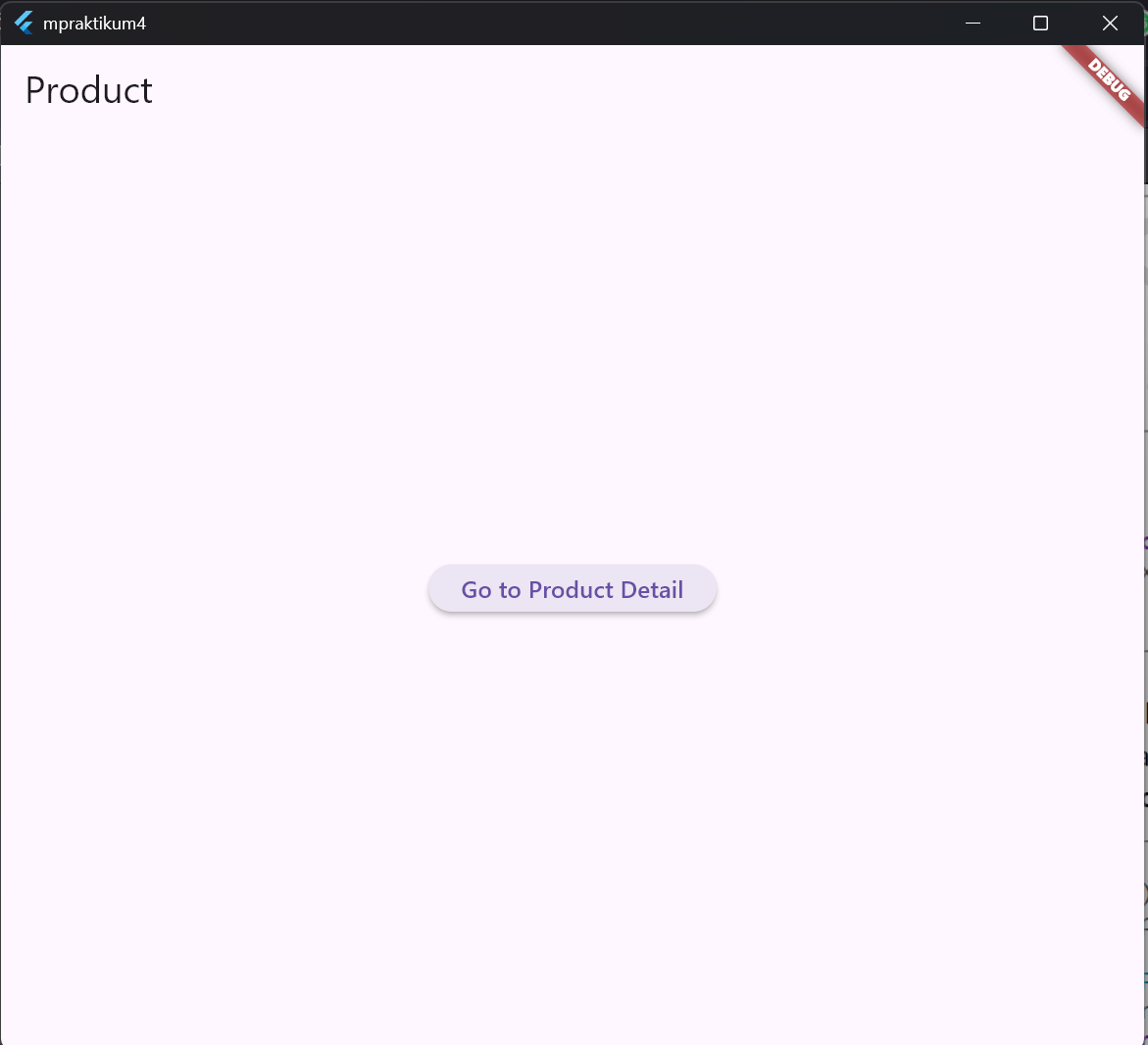
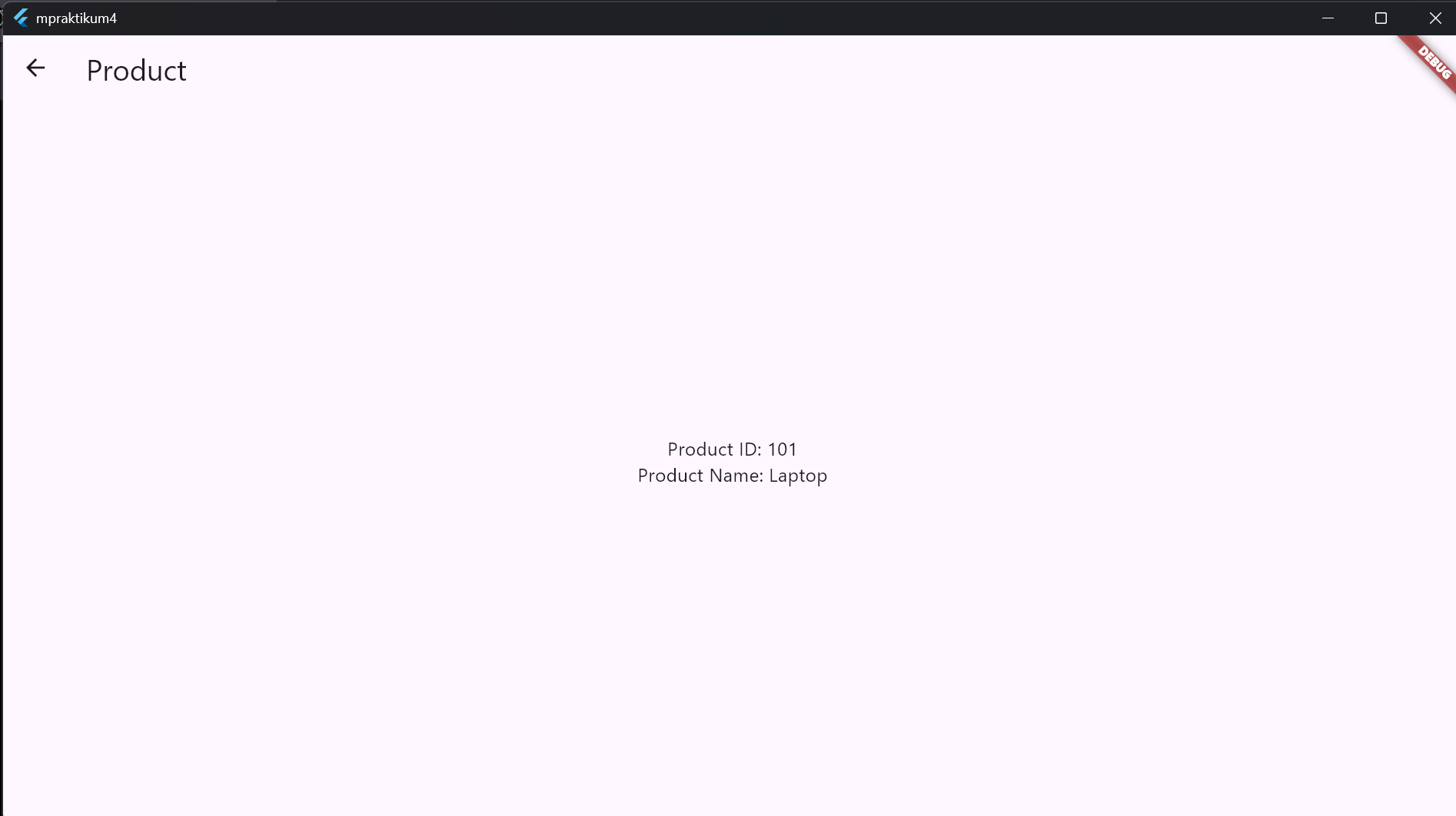
Card image cap Card image cap

Langkah-Langkah

Multiple Screen

return MaterialApp(
  initialRoute: '/',
  routes: {
    '/': (context) => const Product(),
    '/product_detail': (context) => const ProductDetail(),
  },
);
Kode Program Lengkap Navigation dan Routing
import 'package:flutter/material.dart';

void main() => runApp(const MyNav());

class MyNav extends StatelessWidget {
  const MyNav({super.key});

  @override
  Widget build(BuildContext context) {
    return MaterialApp(
      initialRoute: '/',
      routes: {
        '/': (context) => const Product(),
        '/product_detail': (context) => const ProductDetail(),
      },
    );
  }
}

class Product extends StatelessWidget {
  const Product({super.key});

  @override
  Widget build(BuildContext context) {
    return Scaffold(
      appBar: AppBar(title: const Text('Product')),
      body: Center(
        child: ElevatedButton(
          onPressed: () {
            Navigator.pushNamed(context, '/product_detail');
          },
          child: const Text('Go to Product Detail'),
        ),
      ),
    );
  }
}

class ProductDetail extends StatelessWidget {
  const ProductDetail({super.key});

  @override
  Widget build(BuildContext context) {
    return Scaffold(
      appBar: AppBar(title: const Text('Product Detail')),
      body: Center(
        child: ElevatedButton(
          onPressed: () {
            Navigator.pop(context);
          },
          child: const Text('Back to Product'),
        ),
      ),
    );
  }
}

Mengirim dan Menerima Data

return MaterialApp(
  initialRoute: '/',
  routes: {
    '/': (context) => const HomePage(),
    '/product': (context) => const MyProduct(),
  },
);
ElevatedButton(
  onPressed: () {
    Navigator.push(
      context,
      MaterialPageRoute(
        builder: (context) => const MyProfile(id: 1, name: 'Masnoer'),
      ),
    );
  },
  child: const Text('Profile'),
)

Menerima dan menampilkan data pada MyProfile

class MyProfile extends StatelessWidget {
  final int id;
  final String name;
  const MyProfile({super.key, required this.id, required this.name});

  @override
  Widget build(BuildContext context) {
    return Scaffold(
      appBar: AppBar(title: const Text('Profile')),
      body: Center(
        child: Column(
          mainAxisAlignment: MainAxisAlignment.center,
          children: [
            Text('ID: $id'),
            Text('Name: $name'),
          ],
        ),
      ),
    );
  }
}
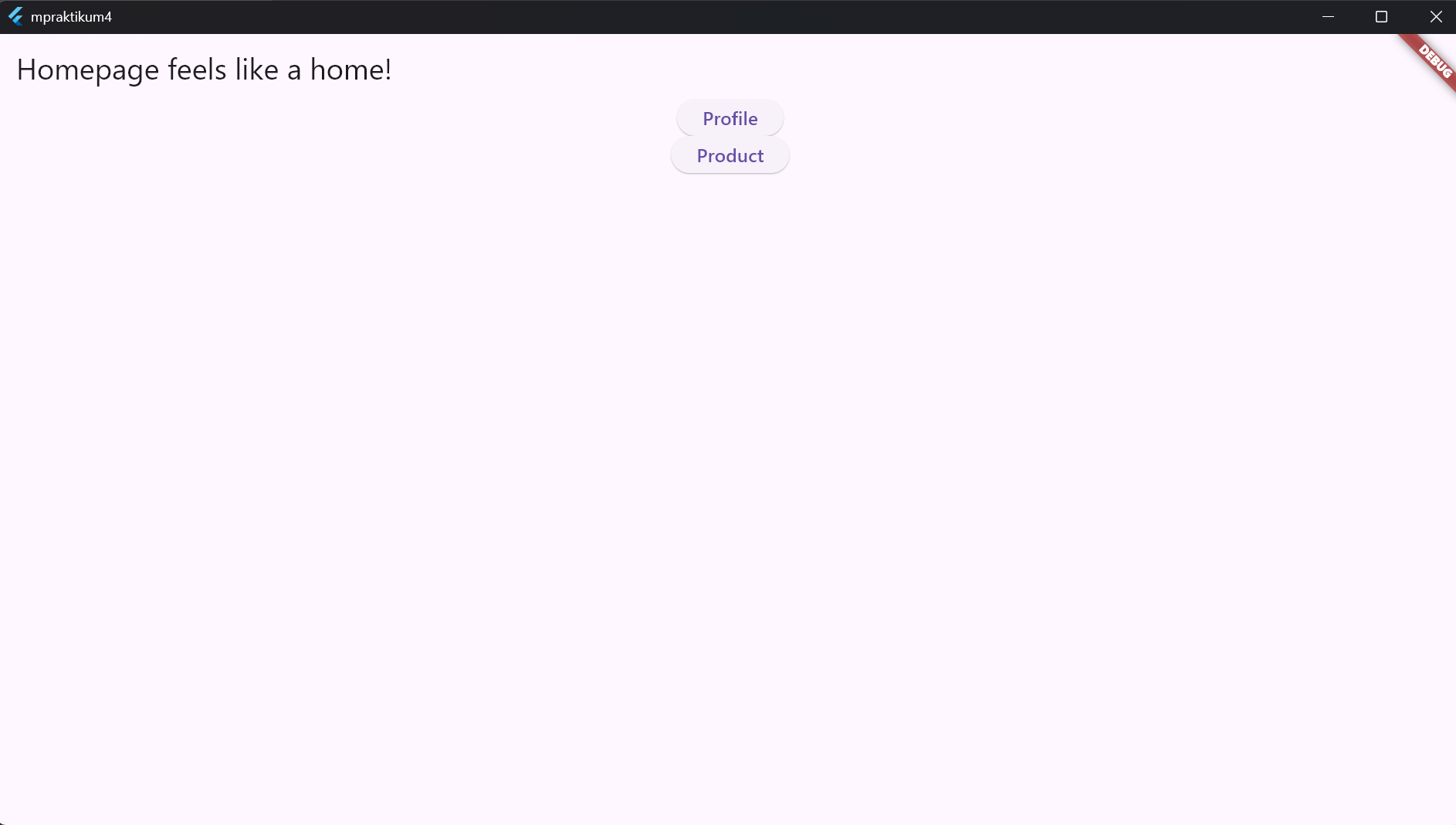
Pindah ke MyProduct menggunakan named routes dan kirim data

ElevatedButton(
  onPressed: () {
    Navigator.pushNamed(
      context,
      '/product',
      arguments: {'id': 101, 'name': 'Laptop'},
    );
  },
  child: const Text('Product'),
)

Menerima dan menampilkan data pada MyProduct

class MyProduct extends StatelessWidget {
  const MyProduct({super.key});

  @override
  Widget build(BuildContext context) {
    final args = ModalRoute.of(context)!.settings.arguments as Map?;
    final int id = args?['id'] ?? 0;
    final String name = args?['name'] ?? 'Unknown';

    return Scaffold(
      appBar: AppBar(title: const Text('Product')),
      body: Center(
        child: Column(
          mainAxisAlignment: MainAxisAlignment.center,
          children: [
            Text('Product ID: $id'),
            Text('Product Name: $name'),
          ],
        ),
      ),
    );
  }
}
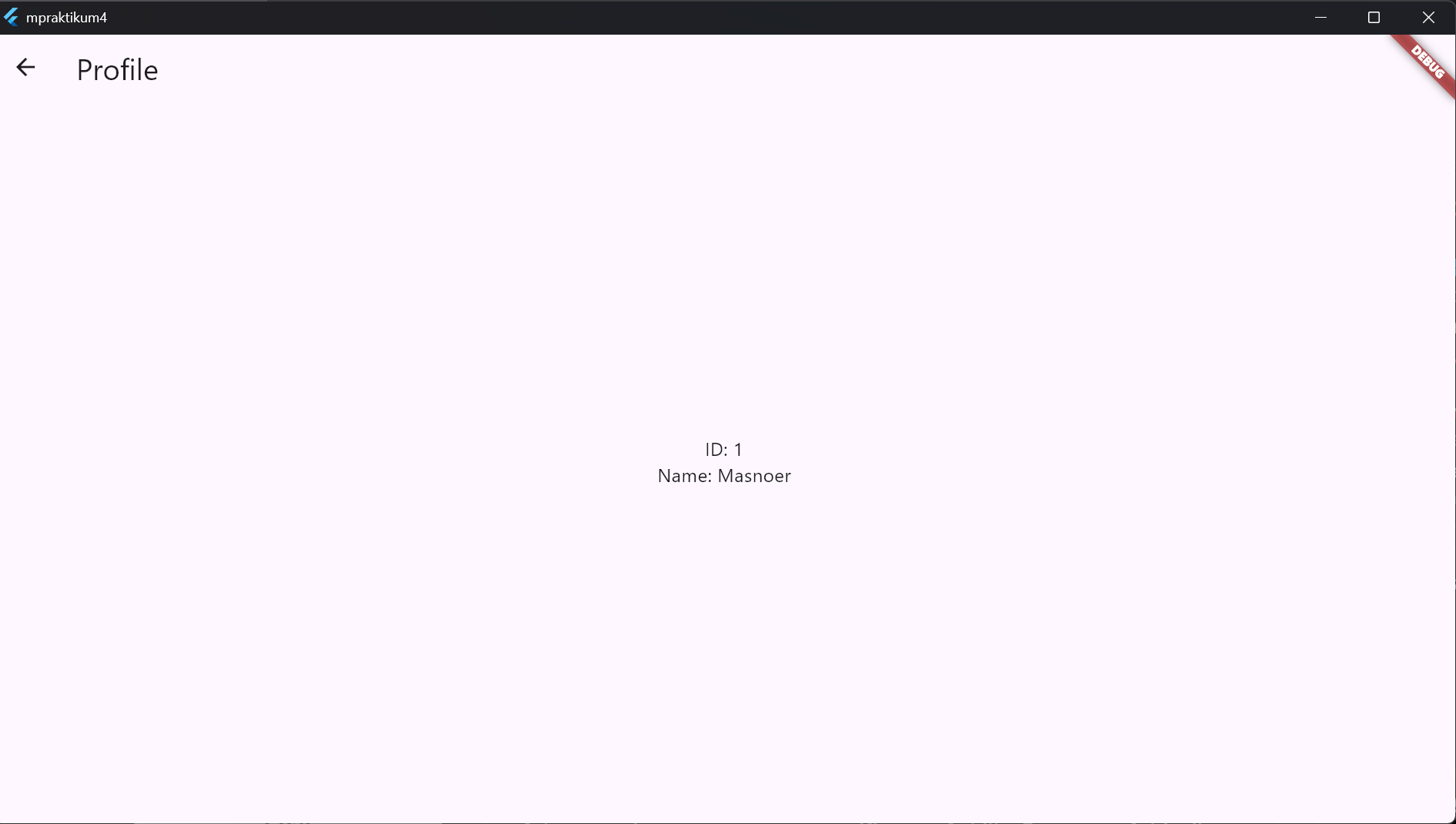
Card image cap Card image cap

Latihan / Tugas

Latihan 1: Halaman Login dan Halaman Utama
Latihan 2: Widget Navigasi

Beberapa widget Flutter telah menggunakan konsep Navigation dan Routing, seperti:

Berikan contoh penerapan salah satu dari ketiga widget tersebut dalam bentuk aplikasi Flutter sederhana.

Kode

import 'package:flutter/material.dart';

class MyTugas extends StatelessWidget {
  const MyTugas({super.key});

  // This widget is the root of your application.
  @override
  Widget build(BuildContext context) {
    return MaterialApp(
      title: 'Flutter Demo',
      theme: ThemeData(
        // This is the theme of your application.
        //
        // TRY THIS: Try running your application with "flutter run". You'll see
        // the application has a purple toolbar. Then, without quitting the app,
        // try changing the seedColor in the colorScheme below to Colors.green
        // and then invoke "hot reload" (save your changes or press the "hot
        // reload" button in a Flutter-supported IDE, or press "r" if you used
        // the command line to start the app).
        //
        // Notice that the counter didn't reset back to zero; the application
        // state is not lost during the reload. To reset the state, use hot
        // restart instead.
        //
        // This works for code too, not just values: Most code changes can be
        // tested with just a hot reload.
        colorScheme: ColorScheme.fromSeed(seedColor: Colors.deepPurple),
      ),
      home: Scaffold(
        appBar: AppBar(
          title: const Text("Log in Form so easy"),
          backgroundColor: Theme.of(context).colorScheme.primary,
        ),
        body: Center(child: const RegisterWidget()),
      ),
    );
  }
}

class RegisterWidget extends StatefulWidget {
  const RegisterWidget({super.key});

  @override
  State<RegisterWidget> createState() => _RegisterWidgetState();
}

class _RegisterWidgetState extends State<RegisterWidget> {
  final emailRegex = RegExp(r'^[\w-\.]+@([\w-]+\.)+[\w-]{2,4}$');
  final _formKey = GlobalKey<FormState>();
  final _emailController = TextEditingController();
  final _passwordController = TextEditingController();
  final _confirmController = TextEditingController();
  final _usernameController = TextEditingController();

  @override
  void dispose() {
    _emailController.dispose();
    _passwordController.dispose();
    _confirmController.dispose();
    _usernameController.dispose();
    super.dispose();
  }

  void _submitForm() {
    if (_formKey.currentState!.validate()) {
      print(
        'Registering: ${_usernameController.text}, ${_emailController.text}',
      );
      User currentUser = User(
        name: _usernameController.text,
        email: _emailController.text,
        createdAt: DateTime.now(),
      );
      Navigator.push(
        context,
        MaterialPageRoute(
          builder: (context) => HomePageTugas(currentUser: currentUser),
        ),
      );
    }
  }

  @override
  Widget build(BuildContext context) {
    return Padding(
      padding: EdgeInsets.all(40.0),
      child: Form(
        key: _formKey,
        child: Column(
          children: [
            TextFormField(
              decoration: const InputDecoration(
                labelText: 'Nama pengguna',
                prefixIcon: Icon(Icons.person),
              ),
              controller: _usernameController,

              validator: (value) {
                if (value == null || value.isEmpty) {
                  return 'Tidak boleh kosong!';
                }
                return null;
              },
            ),
            const SizedBox(height: 16),
            TextFormField(
              decoration: const InputDecoration(
                labelText: 'Email',
                prefixIcon: Icon(Icons.email),
              ),
              controller: _emailController,

              validator: (value) {
                if (value == null || value.isEmpty) {
                  return 'Email wajib diisi';
                } else if (!emailRegex.hasMatch(value)) {
                  return 'Format email tidak valid';
                }
                return null;
              },
            ),
            const SizedBox(height: 16),
            TextFormField(
              decoration: const InputDecoration(
                labelText: 'Kata sandi',
                prefixIcon: Icon(Icons.lock),
              ),
              controller: _passwordController,
              obscureText: true,

              validator: (value) {
                if (value == null || value.isEmpty) {
                  return 'Kata sandi wajib diisi';
                }
                if (value.length < 6) {
                  return 'Kata sandi tidak boleh kecil dari 6';
                }
                return null;
              },
            ),
            const SizedBox(height: 16),
            TextFormField(
              decoration: const InputDecoration(
                labelText: 'Konfirmasi kata sandi',

                prefixIcon: Icon(Icons.lock),
              ),
              obscureText: true,
              controller: _confirmController,

              validator: (value) => value == _passwordController.text
                  ? null
                  : 'Kata sandi tidak cocok',
            ),
            const SizedBox(height: 16),
            ElevatedButton(
              onPressed: _submitForm,
              style: ElevatedButton.styleFrom(
                backgroundColor: Colors.deepPurple,
                foregroundColor: Colors.white,
                padding: const EdgeInsets.symmetric(
                  horizontal: 32,
                  vertical: 14,
                ),
                shape: RoundedRectangleBorder(
                  borderRadius: BorderRadius.circular(12),
                ),
                elevation: 6,
                textStyle: const TextStyle(
                  fontSize: 16,
                  fontWeight: FontWeight.bold,
                  letterSpacing: 1.2,
                ),
              ),
              child: const Text('Daftar Sekarang'),
            ),
          ],
        ),
      ),
    );
  }
}

class User {
  final String name;
  final DateTime createdAt;
  final String email;
  User({required this.name, required this.createdAt, required this.email});
}

class HomePageTugas extends StatefulWidget {
  final User currentUser;
  const HomePageTugas({super.key, required this.currentUser});
  @override
  _MyHomePageState createState() => _MyHomePageState();
}

class _MyHomePageState extends State<HomePageTugas> {
  int _selectedIndex = 0;

  late List<Widget> _pages;
  @override
  void initState() {
    super.initState();
    _pages = [
      HomePage(),
      AboutMeSection(),
      ProfilePage(currentUser: widget.currentUser),
    ];
  }

  void _onItemTapped(int index) {
    setState(() {
      _selectedIndex = index;
    });
  }

  @override
  Widget build(BuildContext context) {
    return Scaffold(
      appBar: AppBar(
        title: Text('Aplikasi Mobile Tampilan Sederhana'),
        backgroundColor: Theme.of(context).colorScheme.inversePrimary,
      ),
      body: _pages[_selectedIndex],
      bottomNavigationBar: BottomNavigationBar(
        currentIndex: _selectedIndex,
        onTap: _onItemTapped,
        items: const <BottomNavigationBarItem>[
          BottomNavigationBarItem(icon: Icon(Icons.home), label: 'Home'),
          BottomNavigationBarItem(
            icon: Icon(Icons.description),
            label: 'About App',
          ),
          BottomNavigationBarItem(icon: Icon(Icons.person), label: 'Profile'),
        ],
      ),
    );
  }
}

class ProfilePage extends StatelessWidget {
  @override
  final User currentUser;

  const ProfilePage({super.key, required this.currentUser});
  Widget build(BuildContext context) {
    return Center(
      child: Column(
        children: [
          // Profile Image
          CircleAvatar(
            radius: 50,
            backgroundImage: AssetImage(
              'assets/image/profile.png',
            ), // Replace with your image
          ),
          SizedBox(height: 16),

          // Name and Title
          Text(
            'Hello, ${currentUser.name}',
            style: TextStyle(fontSize: 24, fontWeight: FontWeight.bold),
          ),
          SizedBox(height: 24),
          Text(
            'Your account was reated at ${currentUser.email}',
            style: TextStyle(fontSize: 16, color: Colors.grey[600]),
          ),
          Text(
            'Your account was reated at ${currentUser.createdAt}',
            style: TextStyle(fontSize: 16, color: Colors.grey[600]),
          ),
          SizedBox(height: 24),
        ],
      ),
    );
  }
}

class HomePage extends StatelessWidget {
  @override
  Widget build(BuildContext context) {
    return Center(
      child: Text(
        'Make payments easy',
        style: TextStyle(fontSize: 24, fontWeight: FontWeight.bold),
      ),
    );
  }
}

class AboutMeSection extends StatelessWidget {
  @override
  Widget build(BuildContext context) {
    return Center(
      child: Card(
        margin: EdgeInsets.all(16),
        elevation: 4,
        child: Padding(
          padding: const EdgeInsets.all(16.0),
          child: Column(
            crossAxisAlignment: CrossAxisAlignment.start,
            children: [
              Text(
                'About App',
                style: TextStyle(fontSize: 20, fontWeight: FontWeight.bold),
              ),
              SizedBox(height: 12),
              Text(
                'Hello and Welcome to Notomatis! However this is just a basic prototype of the full app, stay tuned!',
                style: TextStyle(fontSize: 16),
              ),
            ],
          ),
        ),
      ),
    );
  }
}
import 'package:flutter/material.dart';
import 'package:mpraktikum4/basicnav.dart';
import 'package:mpraktikum4/named_nav.dart';
import 'package:mpraktikum4/tugas.dart';

void main() {
  runApp(const MyTugas());
}

class MyApp extends StatelessWidget {
  const MyApp({super.key});

  // This widget is the root of your application.
  @override
  Widget build(BuildContext context) {
    return MaterialApp(
      title: 'Flutter Demo',
      theme: ThemeData(
        // This is the theme of your application.
        //
        // TRY THIS: Try running your application with "flutter run". You'll see
        // the application has a purple toolbar. Then, without quitting the app,
        // try changing the seedColor in the colorScheme below to Colors.green
        // and then invoke "hot reload" (save your changes or press the "hot
        // reload" button in a Flutter-supported IDE, or press "r" if you used
        // the command line to start the app).
        //
        // Notice that the counter didn't reset back to zero; the application
        // state is not lost during the reload. To reset the state, use hot
        // restart instead.
        //
        // This works for code too, not just values: Most code changes can be
        // tested with just a hot reload.
        colorScheme: ColorScheme.fromSeed(seedColor: Colors.deepPurple),
      ),
      home: const MyHomePage(title: 'Flutter Demo Home Page'),
    );
  }
}

class MyHomePage extends StatefulWidget {
  const MyHomePage({super.key, required this.title});

  // This widget is the home page of your application. It is stateful, meaning
  // that it has a State object (defined below) that contains fields that affect
  // how it looks.

  // This class is the configuration for the state. It holds the values (in this
  // case the title) provided by the parent (in this case the App widget) and
  // used by the build method of the State. Fields in a Widget subclass are
  // always marked "final".

  final String title;

  @override
  State<MyHomePage> createState() => _MyHomePageState();
}

class _MyHomePageState extends State<MyHomePage> {
  int _counter = 0;

  void _incrementCounter() {
    setState(() {
      // This call to setState tells the Flutter framework that something has
      // changed in this State, which causes it to rerun the build method below
      // so that the display can reflect the updated values. If we changed
      // _counter without calling setState(), then the build method would not be
      // called again, and so nothing would appear to happen.
      _counter++;
    });
  }

  @override
  Widget build(BuildContext context) {
    // This method is rerun every time setState is called, for instance as done
    // by the _incrementCounter method above.
    //
    // The Flutter framework has been optimized to make rerunning build methods
    // fast, so that you can just rebuild anything that needs updating rather
    // than having to individually change instances of widgets.
    return Scaffold(
      appBar: AppBar(
        // TRY THIS: Try changing the color here to a specific color (to
        // Colors.amber, perhaps?) and trigger a hot reload to see the AppBar
        // change color while the other colors stay the same.
        backgroundColor: Theme.of(context).colorScheme.inversePrimary,
        // Here we take the value from the MyHomePage object that was created by
        // the App.build method, and use it to set our appbar title.
        title: Text(widget.title),
      ),
      body: Center(
        // Center is a layout widget. It takes a single child and positions it
        // in the middle of the parent.
        child: Column(
          // Column is also a layout widget. It takes a list of children and
          // arranges them vertically. By default, it sizes itself to fit its
          // children horizontally, and tries to be as tall as its parent.
          //
          // Column has various properties to control how it sizes itself and
          // how it positions its children. Here we use mainAxisAlignment to
          // center the children vertically; the main axis here is the vertical
          // axis because Columns are vertical (the cross axis would be
          // horizontal).
          //
          // TRY THIS: Invoke "debug painting" (choose the "Toggle Debug Paint"
          // action in the IDE, or press "p" in the console), to see the
          // wireframe for each widget.
          mainAxisAlignment: MainAxisAlignment.center,
          children: <Widget>[
            const Text('You have pushed the button this many times:'),
            Text(
              '$_counter',
              style: Theme.of(context).textTheme.headlineMedium,
            ),
          ],
        ),
      ),
      floatingActionButton: FloatingActionButton(
        onPressed: _incrementCounter,
        tooltip: 'Increment',
        child: const Icon(Icons.add),
      ), // This trailing comma makes auto-formatting nicer for build methods.
    );
  }
}

Video Presentasi

Repositori Proyek


Document